
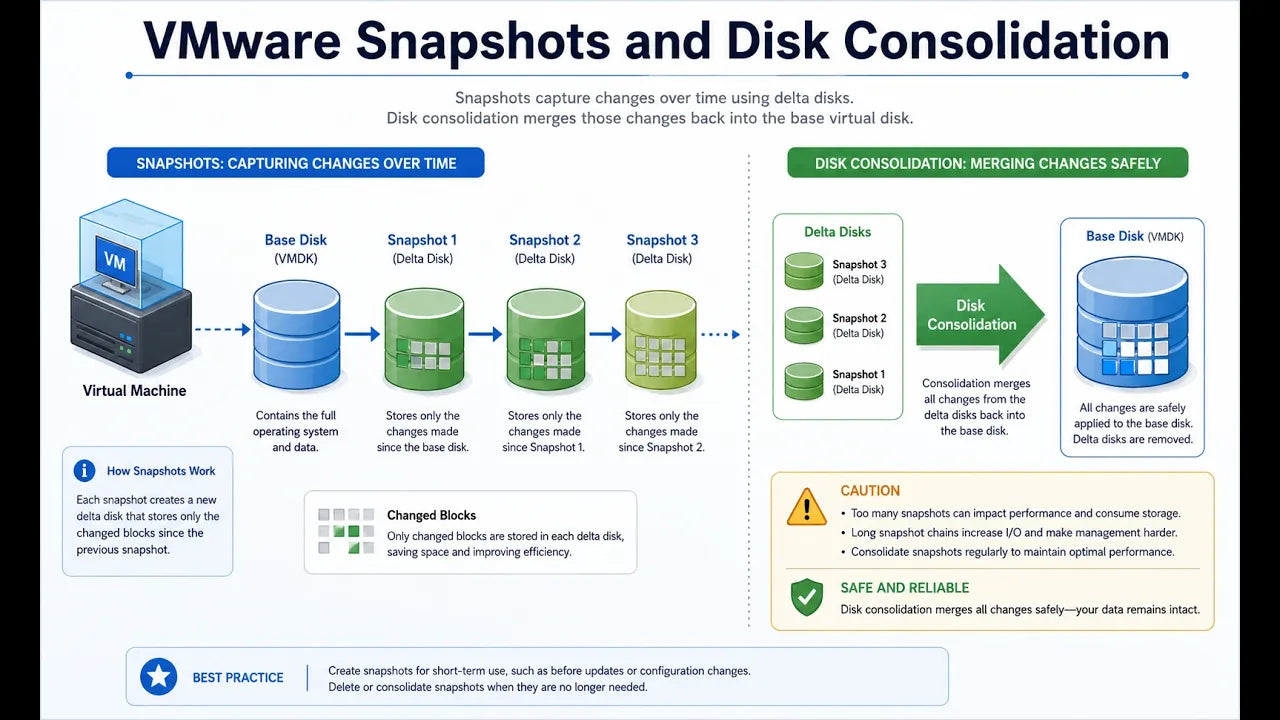
VMware snapshots can be very useful when you need a temporary safety net. For example, before applying updates, changing a configuration, or testing something new, taking a snapshot gives you a way to roll back if something goes wrong.
But snapshots are not meant to sit there forever.
How a VMware Snapshot Works
When you take a snapshot, VMware keeps the original virtual disk in place. From that point on, new changes are written to a separate delta disk, also called a differencing disk.
That means the virtual machine is no longer writing everything directly to the original disk. It is writing changes to the snapshot file.
If the change you made causes problems, you can roll back to the point before the snapshot was taken. If everything works fine, the snapshot needs to be deleted so the changes can be merged back into the main disk.
That is where people sometimes get into trouble.
Do Not Leave Snapshots Sitting Around
A snapshot can feel like a nice backup plan, so it is tempting to leave it there “just in case.”
The problem is that the delta disk keeps growing as the server keeps running. The longer the snapshot stays in place, the bigger that file can become.
Over time, this can create real problems. You can run out of disk space. The virtual machine can slow down. In some cases, the system can even become unstable or crash.
Snapshots are useful, but they are not backups.
Multiple Snapshots Can Create More Cleanup
You can also take more than one snapshot on a virtual machine. Each snapshot can create another delta disk.
That might be fine for a short period of time, but if those snapshots stack up, cleanup becomes more complicated.
Even after snapshots are deleted, VMware may still say that disk consolidation is needed. Disk consolidation is the process of taking those snapshot delta files and merging them back into a single virtual disk.
Depending on how large the snapshot files are, that process can take a while.
The Simple Rule
The best practice is pretty straightforward.
- Take the snapshot.
- Do the work.
- Make sure everything is working.
- Delete the snapshot.
Do not keep it around because you might need it someday. If you need long-term protection, use a real backup solution.
The same idea applies to other virtualization platforms too, including Hyper-V.
Final Thoughts
Snapshots are a good short-term tool. They are great before maintenance, upgrades, or testing.
But they are not a replacement for backups, and they should not be treated like one.
Leaving snapshots active for too long can create storage issues, performance problems, and unnecessary risk for your business systems.
At ADS Consulting Group, we help businesses keep their virtual environments, backups, and infrastructure running properly so small maintenance items do not turn into major problems.
If you are not sure whether your VMware environment, backups, or snapshot cleanup process is in good shape, we can help you take a closer look.
Book a free discovery call with ADS Consulting Group: https://www.adscon.com/discovery-call